I wanted to make a few general changes and add some more enemy animations.
Enemy Header
AAIController* AIController;
UBlackboardComponent* BlackboardComponentref;
I have made these accessible anywhere, not just “beginplay”, as this way I can set blackboard values at any time.
Enemy CPP file
void ACompetitionEnemy::BeginPlay()
...
//set the enemy state initially
BlackboardComponentref->SetValueAsName(FName("CurrentState"), ACompetitionEnemy::EnemyState);
void ACompetitionEnemy::Damage(float DamageValue)
...
if (health <= 0)
{
//used to play knocked animation
EnemyState = "KnockedDown";void ACompetitionEnemy::Reset()
{
//restores health on succesfull enemy recovery
if (health <= 0)
{
health = 100;These are just some minor changes to allow animations and proper Behaviour Tree functionality.
void ACompetitionEnemy::KnockedDown()
{
KnockedDownCount += 1;
SetActorLocation((GetActorLocation() + FVector(100, 0, 0)));
if (KnockedDownCount >= 3)
{
Destroy();
}
else
{
int randomnumber = FMath::RandRange(0, 100);
if (randomnumber < (10 * KnockedDownCount))
{
Destroy();
}
else
{
GetWorldTimerManager().SetTimer(KnockedHandle, this, &ACompetitionEnemy::Reset, 2.0f, false);
This function will increment the “knockeddowncount” and push the enemy back to avoid further collisions. If the count is over or equal to 3, it will destroy the enemy . Otherwise, it will generate a random number between 0 and 100, then check it against a set range that gets bigger with more knockdowns. If it is within the range, the enemy will die; otherwise it will setup a reset counter.
void ACompetitionEnemy::Tick(float DeltaTime)
{
...
BlackboardComponentref->SetValueAsName(FName("CurrentState"), ACompetitionEnemy::EnemyState);
Also the blackboard is constantly updated accordingly.
Knocked Down Behaviour Tree Task CPP
EBTNodeResult::Type UBTTask_KnockedDown::ExecuteTask(UBehaviorTreeComponent& OwnerComp, uint8* NodeMemory)
{
if (auto* const cont = Cast<AAIC_enemy>(OwnerComp.GetAIOwner()))
{
if (auto* const npc = cont->GetPawn())
{
//if the controlled pawn is of the enemy class
if (auto* const enemy = Cast<ACompetitionEnemy>(npc))
{
//execute function
enemy->KnockedDown();
This is a very simple task I setup that executes a function upon being called, this will be used in the Behaviour Tree as shown below.
Enemy Behaviour Tree
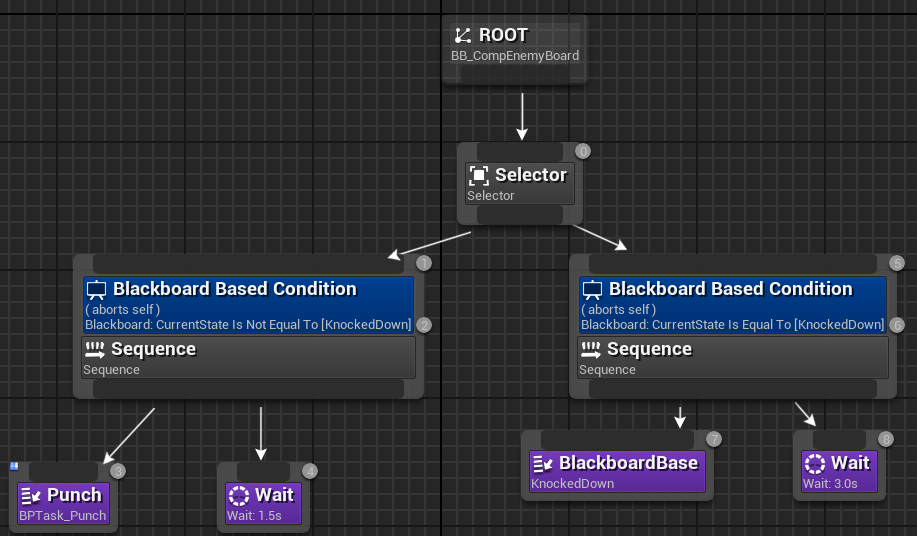
This Behaviour Tree will abort the standard tasks if the enemy is knocked down and play the corresponding enemy function. I also added a wait task to prevent the “KnockedDown” task from looping.
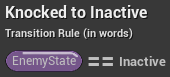
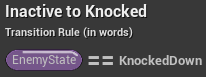
Enemy Animation BP

Player Header
UPROPERTY(EditAnywhere, BlueprintReadWrite, Category = State)
FString State = "inactive";

UFUNCTION(BlueprintCallable)
void ResetControl();
I have made both these blueprint editable for use in animations.
Player C++
void ACompetitionCharacter::SuperPunch()
...
State = "FailedSuper";
GetWorldTimerManager().SetTimer(PunchTimerHandle, this, &ACompetitionCharacter::ResetPunch, 1.0f, false);
Here I make it so the punch is reset if the player doesn’t reach the charge requirements.
Also, I have modified my code so “reset control” is no longer called via timer after a dodge or punch. Instead it is called at the end of the animation in Blueprints.
Player Animation Interrupt

This interrupt is called at the end of the dodge and punch animations, this will prevent bugs with animations stuttering.
Player Animation Blueprint
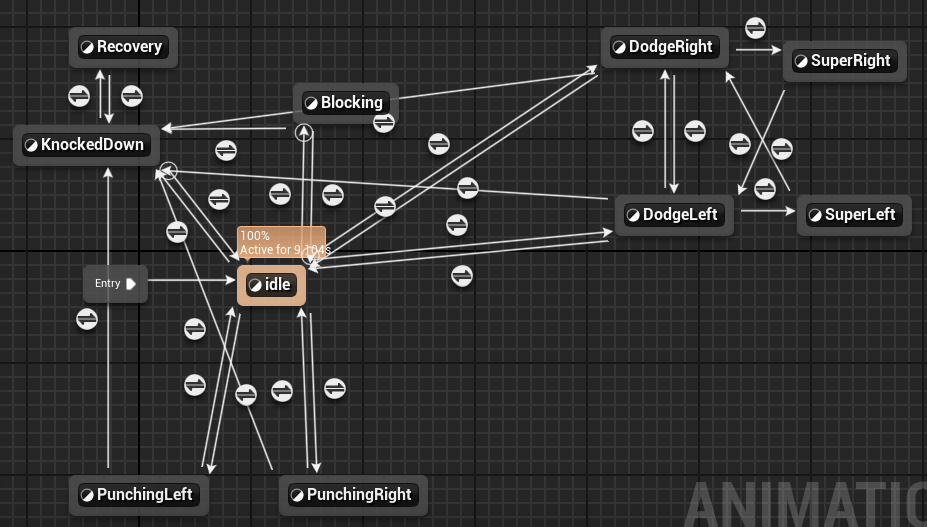
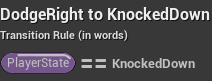
I have linked almost every animation to “KnockedDown” with the same transition rule, this will fix the bug of animations still playing once the player is knocked down.